CyberIncidents Logo
Incident Investigation

Unicode Homograph Attacks: How Lookalike Characters Enable Phishing and Domain Impersonation

Homograph attacks

Rohith HariOctober 27, 20266 min read
Unicode Homograph Attacks: How Lookalike Characters Enable Phishing and Domain Impersonation


1. Quick Summary

Unicode homograph attacks exploit visually similar characters from different writing systems to make malicious domain names resemble legitimate websites. Attackers may substitute Latin characters with visually similar Cyrillic or Greek characters, tricking users into visiting fraudulent websites and potentially exposing their credentials or sensitive information.

These attacks can support phishing, brand impersonation, and account takeover campaigns because a deceptive URL may appear genuine during a quick visual inspection.

Key takeaway: Never rely on how a domain looks alone. Verify the actual website address before entering credentials or sensitive information.

2. Detailed Article

What Is a Unicode Homograph Attack?

A Unicode homograph attack is a technique in which an attacker uses characters that look alike but have different underlying character codes to create deceptive text, including domain names.

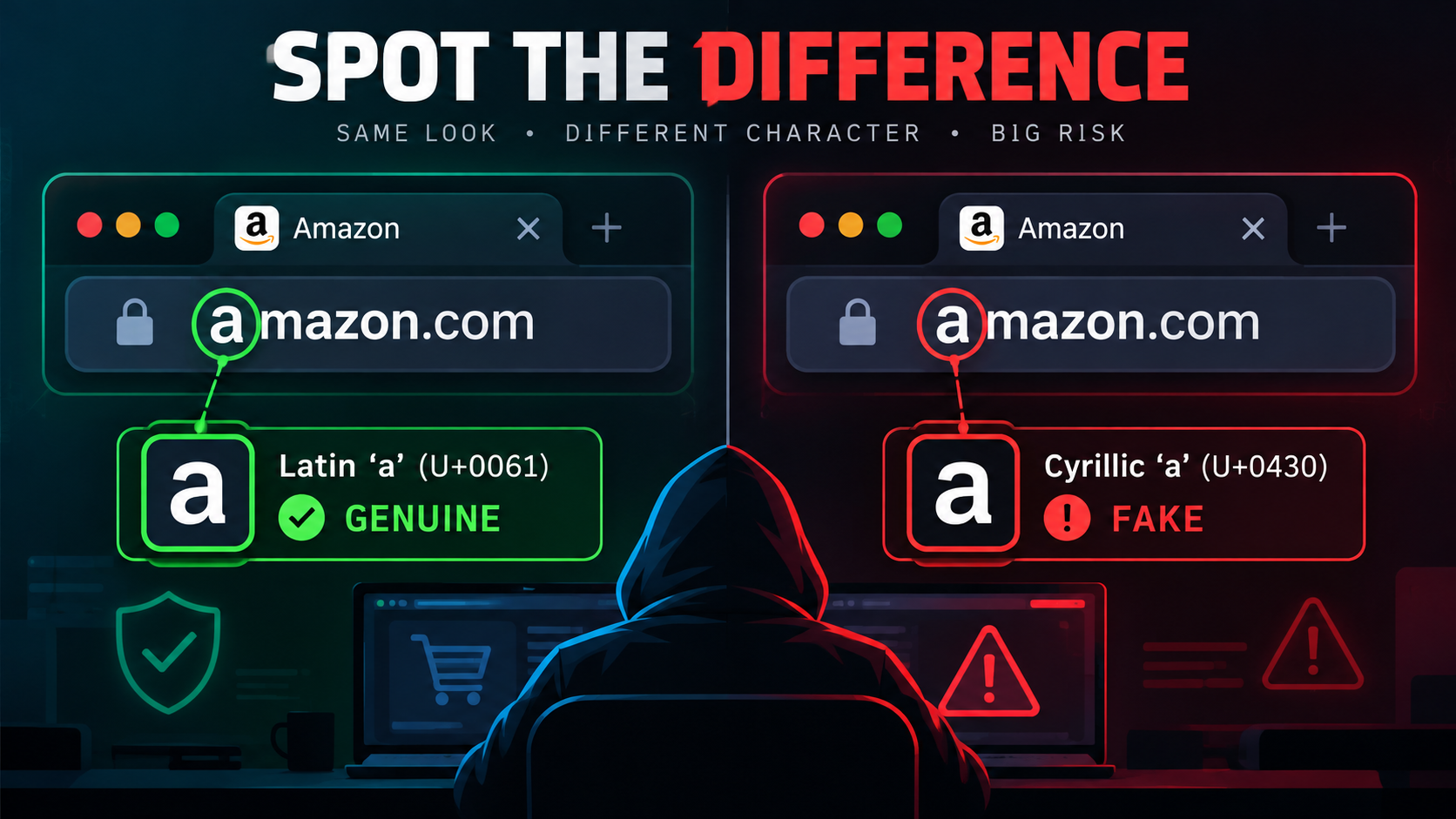
For example, the Latin letter a and the Cyrillic letter а may look almost identical in some fonts:

  • Genuine: amazon.com — contains the Latin letter a (U+0061).

  • Lookalike example: аmazon.com — begins with the Cyrillic letter а (U+0430).

Although the two addresses may appear visually identical, they contain different characters and can refer to different domains. A malicious actor could register a lookalike domain, if permitted by the relevant domain-registration rules, and use it to host a fraudulent login page.

How the Attack Works

A typical attack may follow these steps:

  1. Create a lookalike domain: The attacker identifies a legitimate brand or service and substitutes one or more characters with visually similar characters from another alphabet.

  2. Build a fraudulent website: The domain hosts a page that imitates a legitimate login portal, payment page, or business application.

  3. Distribute the link: The attacker sends the URL through phishing emails, SMS messages, social media, or collaboration platforms.

  4. Exploit visual similarity: The victim believes the domain is legitimate because it resembles a familiar website.

  5. Capture sensitive information: If the victim enters credentials or other information, the attacker may collect it and attempt to access the victim's account.

The attack's success depends on factors such as the similarity of the characters, browser presentation, user awareness, and whether security controls detect or block the domain.

Why Homograph Attacks Are Dangerous

Credential theft: A counterfeit login page can collect usernames, passwords, and other information submitted by unsuspecting users.

Brand impersonation: Attackers can imitate trusted organizations, making fraudulent websites and messages appear credible.

Business email and payment fraud: Lookalike domains can support deceptive communications that encourage employees or customers to disclose information or make unauthorized payments.

Malware distribution: A deceptive domain may direct visitors to malicious downloads or other harmful content.

Bypassing visual checks: A domain can appear legitimate even when its characters differ from those in the genuine address. A valid HTTPS connection does not, by itself, prove that the website is trustworthy.

How to Detect Homograph Attacks

Users and security teams should avoid relying exclusively on visual inspection.

  • Verify the registered domain: Check the actual hostname and confirm that it belongs to the expected organization.

  • Navigate directly to trusted websites: Use a saved bookmark or manually enter a known, official address rather than following an unexpected link.

  • Inspect unfamiliar links: Be cautious of unexpected login requests, urgent messages, and URLs containing unusual character combinations.

  • Use browser and DNS protections: Security controls can help identify known malicious domains, suspicious destinations, and potential phishing websites.

  • Review internationalized domain names: Security tools can inspect Unicode characters and their corresponding encoded domain representations, helping analysts identify suspicious lookalikes.

Internationalized domain names may be represented using Punycode, an ASCII-compatible encoding that commonly uses the xn-- prefix. This representation can help investigators compare suspicious domains with expected names. However, the presence of Punycode alone does not prove malicious activity because legitimate internationalized domains also use it.


CyberIncidents article image

SOC Investigation Approach

When a suspected homograph domain is reported, the SOC should:

  1. Extract the complete URL and hostname from the original message or security alert.

  2. Compare the hostname against the organization's approved domains and the legitimate brand domain.

  3. Examine the domain's Unicode characters and encoded representation for suspicious substitutions.

  4. Review DNS, proxy, browser, and email-security logs to identify users who accessed the domain.

  5. Determine whether users submitted credentials, downloaded files, or accessed the site through an authenticated session, using available telemetry.

  6. Correlate affected users with subsequent identity-provider and cloud application activity.

  7. Block confirmed malicious domains through appropriate security controls and follow incident-response procedures for exposed accounts or affected endpoints.

Do not classify a domain as malicious solely because it contains Unicode characters or uses Punycode. Validate the domain and supporting evidence before taking disruptive action.

3. IOCs

The supplied example provides character-level investigation pivots rather than confirmed malicious infrastructure.

IndicatorDescription
Latin a — U+0061Character used in the genuine amazon.com example
Cyrillic а — U+0430Lookalike character used at the beginning of the deceptive example
xn-- prefixCommon marker for Punycode-encoded internationalized domain names; not inherently malicious

Important: The example illustrates a homograph technique. It does not establish that the depicted lookalike domain is registered, active, or associated with a real attack. Verify domains before treating them as indicators of compromise.

4. Hunting Strategy

A. Identify Suspicious Lookalike Domains

Use DNS, secure web gateway, proxy, and threat-intelligence telemetry to find domains resembling organizational login portals, widely used cloud services, or trusted brands.

Investigate suspicious character substitutions, unexpected internationalized domain names, and recently observed domains that appear in authentication-related traffic.

B. Analyze Unicode and Punycode Representations

Where supported, use domain-analysis tools to examine Unicode code points and the ASCII-compatible representation of internationalized domain names.

Compare suspicious domains with approved domains, taking into account legitimate internationalized websites and potential false positives.

C. Correlate DNS and Web Activity

Identify endpoints and users that resolved or accessed a suspicious hostname. Review associated URLs, redirects, browser events, and security alerts to establish whether the site presented a login form or delivered a file.

D. Investigate Potential Credential Exposure

For users who accessed a confirmed phishing site, examine available identity logs for unusual sign-ins, unfamiliar devices, suspicious session activity, or unexpected access to sensitive resources.

If credential or session exposure is suspected, follow the organization's identity incident-response procedures, including appropriate credential resets and session revocation.

E. Improve Preventive Controls

Evaluate whether web filtering, DNS security, browser protection, email security, and identity monitoring can identify and prevent access to deceptive domains. Test detections against controlled examples without visiting potentially malicious sites directly from production endpoints.

5. Precautions

  • Verify domains carefully: Check the actual hostname before entering passwords, payment information, or confidential data.

  • Use official bookmarks: Access frequently used services through known, trusted entry points.

  • Adopt phishing-resistant authentication: Passkeys and FIDO2 security keys help resist credential phishing by binding authentication to the legitimate website origin.

  • Deploy DNS and browser protections: Use controls that detect suspicious domains and warn users about potentially malicious destinations.

  • Monitor identity activity: Investigate suspicious sign-ins and resource access after a reported phishing interaction.

  • Educate employees: Explain that visually identical characters can have different underlying code points.

  • Establish a reporting process: Encourage users to report suspicious URLs immediately, even if they did not enter any information.

  • Respond promptly to exposure: If credentials or sessions may have been compromised, investigate the affected account and revoke access where appropriate.