Cyber News
Citrix patches NetScaler SAML zero-day exploited in attacks
Severity: High CVSS: 8.7 Affected Products: Citrix NetScaler ADC & NetScaler Gateway Attack Type: Denial of Service / Possible Remote Code Execution
8 min read


Category: Phishing / Artificial Intelligence
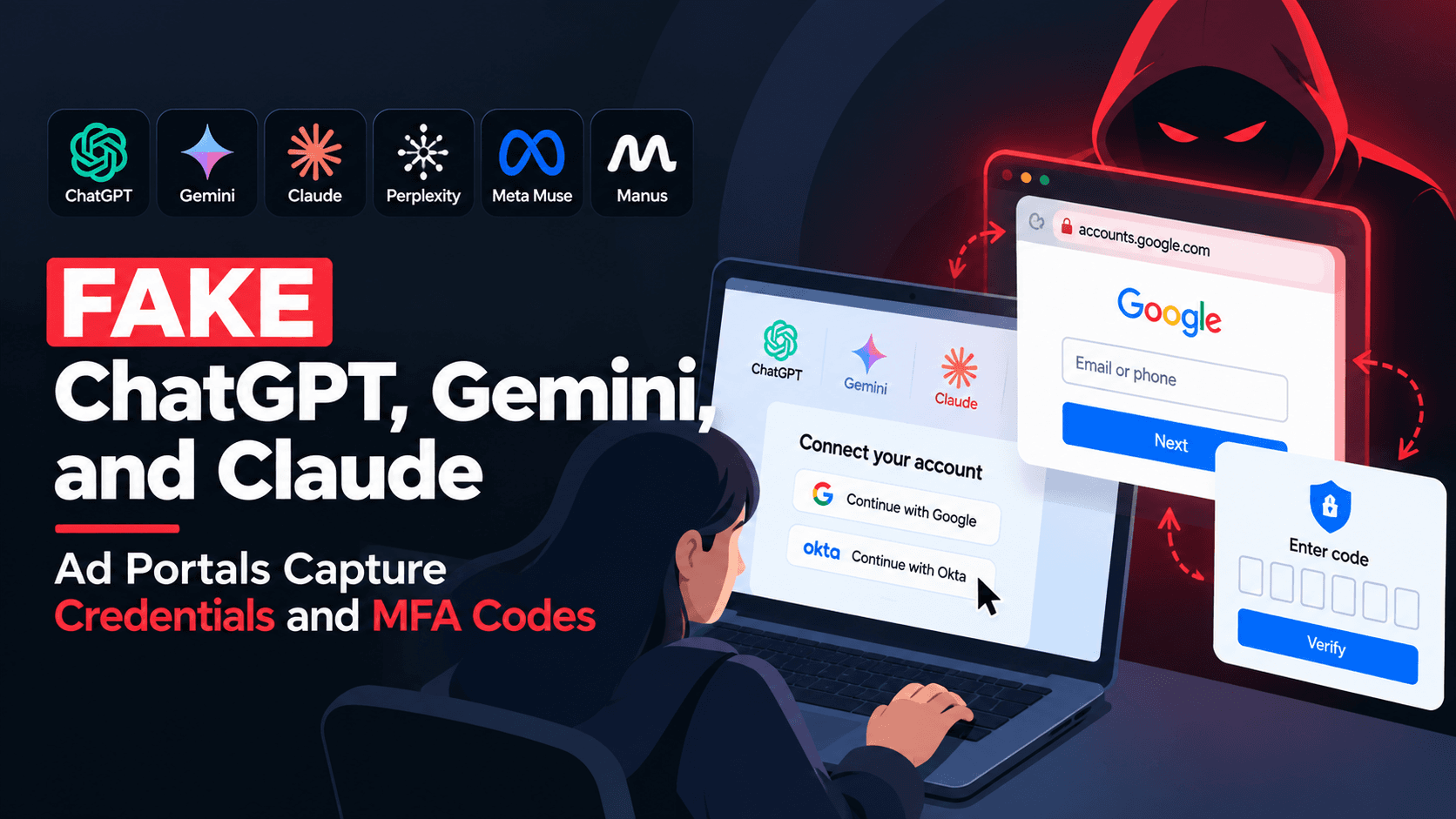
Cybersecurity researchers have uncovered a human-operated phishing platform impersonating popular AI services such as ChatGPT, Gemini, Claude, Perplexity, Meta Muse, and Manus. The fake advertising portals use Browser-in-the-Browser (BitB) techniques to imitate trusted Google and Okta login windows and capture usernames, passwords, and MFA codes in real time.
The campaign goes beyond traditional credential phishing by allowing an attacker to interactively control the victim's authentication flow, fingerprint the device, and attempt to use stolen credentials immediately. The infrastructure also uses Next.js and Socket.IO, providing useful technical artifacts for SOC analysts and threat hunters.
Imagine receiving an invitation to a new advertising platform for ChatGPT, Gemini, or Claude.
The website looks professional.
The branding looks familiar.
The page asks you to connect your advertising account.
You click Connect.
A login window appears, and everything looks normal—including the address bar showing a trusted service such as Google or Okta.
You enter your username and password.
Then comes the MFA prompt.
You enter the verification code.
From your perspective, you have simply connected an advertising account.
Behind the scenes, however, an attacker may already be watching the entire authentication process.
That is the technique behind a phishing campaign uncovered by security researchers at Island, involving fake advertising portals impersonating AI brands and designed to steal credentials and MFA codes in real time.
Researchers identified a human-operated phishing platform impersonating advertising products associated with several popular AI services, including:
ChatGPT
Google Gemini
Anthropic Claude
Perplexity
Meta Muse
Manus
The websites presented themselves as legitimate advertising or business platforms.
Each site had its own story.
For example:
ChatGPT offered an advertising-related workflow.
Gemini presented manager-account and client-linking functionality.
Claude appeared as an advertising portal.
Perplexity promoted campaign planning and spend auditing.
Muse presented itself as an AI advertising manager.
Manus offered a private Meta integration.
The websites were not simply static phishing pages.
They were designed as interactive platforms controlled by a human operator.
That detail makes the campaign particularly interesting from a threat-hunting perspective.
One of the most important parts of the campaign was the Connect button.
A visitor would arrive at the fake advertising platform and be encouraged to connect an advertising or business account.
When the victim clicked Connect, the site displayed a fake login window inside the real browser.
This technique is known as:
The attacker creates a fake browser window using webpage elements.
The fake window can contain:
A fake browser frame
A fake address bar
A familiar login page
A legitimate-looking domain
Familiar branding
The victim may therefore believe they are looking at a genuine Google, Okta, Meta, or other authentication window.
But the important detail is:
The fake login window is actually being rendered by the malicious website.
The real browser remains connected to the attacker's phishing domain.
The campaign reportedly displayed trusted-looking origins such as:
accounts.google[.]com
or an Okta tenant inside the fake browser window.
This is a psychological trick.
Most users naturally look for familiar branding and the expected domain before entering credentials.
The attacker attempts to recreate both.
So the victim sees:
Fake phishing website → Fake browser window → Trusted-looking address bar → Login page
The victim believes:
"I am logging into Google or Okta."
The attacker sees:
"The victim just gave me their credentials."
The most concerning part of the campaign was its handling of MFA.
Many organizations assume that MFA will protect users even if their passwords are stolen.
MFA significantly improves security, but phishing-resistant authentication is important because attackers can sometimes operate in real time against the authentication process.
According to the researchers, the phishing platform captured password attempts and allowed an operator to control which MFA challenge appeared next.
The operator could reportedly request different authentication flows, including:
Password
SMS MFA
Authenticator application
Google prompts
QR verification
Number matching
Okta push
Okta authenticator
Other authentication screens
This created a conversation-like interaction between the attacker and the victim.
This is one of the most interesting characteristics of the campaign.
The phishing infrastructure reportedly allowed a human operator to observe what the victim was doing and decide what happened next.
The platform used commands such as:
/password /2fa /authApp /googlePrompt /googleQrVerify /verifyTap /oktaUsername /oktaPassword /oktaSms2fa /oktaApprove /oktaAuthApp /oktaVerifyTap /wrong2fa /done /banThese commands allowed the operator to influence the authentication flow.
For example, if a victim entered an incorrect MFA code, the operator could reportedly reject it and prompt the victim to try again.
From the victim's perspective, this could simply look like:
"The verification code was incorrect. Please try again."
From the attacker's perspective, it provides another opportunity to obtain a valid authentication code.
The campaign did not focus only on usernames and passwords.
The victim's device was also fingerprinted.
According to the report, information was transmitted to an endpoint:
/api/send/ipThe platform used Socket.IO to exchange information between the phishing page and the operator.
This allowed the infrastructure to support an interactive authentication workflow rather than simply collecting credentials in a database.
For researchers, this is an important distinction.
A traditional phishing page may look like:
Victim → Fake Login → Credentials → Attacker
This campaign was closer to:
Victim → Fake AI Advertising Portal → BitB → Credential Capture → Real-Time Operator → MFA Interaction → Account Access Attempt
One of the identified websites was:
museads.ai
The site reportedly appeared around September 16, 2026, shortly after Meta introduced Muse.
The timing is significant.
The attackers were apparently adapting their phishing infrastructure around current AI-related developments.
The fake service presented itself as an AI advertising manager for paid-media workflows.
The page encouraged users to connect advertising accounts.
Once the victim interacted with the connection workflow, the BitB phishing mechanism was triggered.
The fake login experience reportedly targeted authentication workflows involving services such as:
Meta
TikTok
Okta
This demonstrates an important phishing trend:
Attackers are not necessarily waiting for users to search for "login." They are creating a believable business workflow around the login.
At first glance, stealing an advertising account might not sound as serious as stealing a corporate email account.
But advertising accounts can have significant financial and operational value.
A compromised advertising account may allow attackers to:
Launch their own advertisements
Spend the victim's advertising budget
Abuse the account's reputation
Access business information
Manipulate campaigns
Add unauthorized administrators
Sell the compromised account
For an advertising agency, the impact can become even larger because a compromised manager account may affect multiple clients.
Researchers found that the AI advertising pages were reportedly part of a broader phishing platform.
The same infrastructure supported additional themes, including:
Refund claims
Payment confirmations
The infrastructure also reportedly impersonated recruitment opportunities associated with brands such as:
Tesla
Louis Vuitton
Nike
Adecco
This tells us something important.
The attackers were not building one phishing website for one campaign.
They appeared to have a reusable phishing platform where the branding and story could be changed depending on the target.
Researchers identified common technical characteristics across the websites.
The infrastructure reportedly used:
Next.js
Socket.IO
Common communication endpoints
Similar application behavior
The threat actors also reportedly exposed source code from earlier versions of the platform through misconfigured public GitHub repositories.
For threat researchers, this is particularly valuable because exposed source code can sometimes reveal:
API endpoints
Internal application logic
Command names
Infrastructure patterns
Development artifacts
Historical changes
It can also help researchers connect apparently unrelated phishing campaigns.
The campaign was reportedly designed primarily around people involved in advertising operations, including:
Advertising agency employees
Media buyers
Manager-account administrators
People responsible for advertising platforms
The attackers appear to have chosen these targets because successful compromise can provide access to valuable advertising accounts.
The potential business impact therefore goes beyond credential theft.
A compromised advertising account can become a financial abuse platform.
The identified landing pages were reportedly distributed through fake invitation emails designed to look like communications from trusted brands.
This creates a multi-stage social-engineering attack:
Trusted Brand Impersonation → Fake Invitation → AI Advertising Portal → "Connect" → BitB → Credential Theft → MFA Capture → Account Compromise
The attacker does not need to convince the victim to visit an obviously malicious website.
Instead, the attacker creates a believable story for why the victim should be there.
AI services are becoming part of everyday business operations.
Employees may already expect to receive:
AI tool invitations
New AI product announcements
Advertising integrations
Productivity tool invitations
AI beta-access requests
Business-account connection requests
Attackers can exploit this familiarity.
The report highlights an important pattern:
The phishing campaigns move with the news.
When a new AI product or feature becomes popular, attackers can quickly create fake services around it.
For SOC analysts and threat hunters, this campaign provides several useful hunting opportunities.
Monitor newly registered or newly observed domains using names associated with:
AI products
Advertising platforms
Business integrations
Account-management services
A brand name alone is not enough to classify a domain as malicious, but newly observed domains combined with suspicious authentication behavior deserve investigation.
Look for:
New Domain + Authentication Attempt + New Device + MFA Activity
This combination can provide a stronger signal than any single event.
Pay attention to:
Repeated MFA challenges
Multiple failed MFA attempts
Unexpected push notifications
Number-matching prompts the user did not initiate
Authentication from unusual locations
New device registrations
Organizations using advertising platforms should monitor:
New administrators
Permission changes
New payment methods
Campaign creation
Budget changes
Unexpected account linking
Changes to manager-account relationships
Browser-in-the-Browser attacks can be difficult to detect using traditional email security alone.
Security teams should consider:
URL reputation
Domain age
Browser telemetry
Web proxy logs
Authentication logs
Referrer information
Suspicious authentication sequences
A potential detection strategy could correlate:
Suspicious Invitation
↓
Newly Observed Domain
↓
Account Connection/Login
↓
New Device or Session
↓
Multiple MFA Challenges
↓
Successful Authentication
↓
Advertising Account Changes
The individual events may not immediately indicate compromise.
The sequence is what makes the activity interesting.
Several characteristics make this operation particularly notable:
The attackers adapt their themes to current technology trends.
The fake login window makes the phishing page look like a legitimate browser authentication experience.
The operation goes beyond simple username/password theft.
The operator can reportedly influence the authentication workflow in real time.
The platform collects information about the victim's device.
The same underlying infrastructure can support different brands and phishing themes.
Reportedly identified as one of the fake AI advertising portals.
Reportedly used to transmit victim/device information.
These technologies were reportedly shared across identified sites.
These events were reportedly used to deliver commands to the phishing page.
These should be treated as hunting artifacts, not standalone malicious indicators. Their relevance depends on where and how they are observed.
The phishing pages reportedly displayed trusted-looking origins such as:
accounts.google[.]comand Okta tenant information.
Important: These are not malicious domains in this context. They were displayed inside the fake Browser-in-the-Browser interface to deceive victims.
Prefer authentication methods resistant to real-time phishing, such as appropriate FIDO2/WebAuthn/passkeys.
Investigate unexpected or repeated MFA prompts, especially when the user did not initiate the login.
Alert on:
New administrators
Permission changes
New payment methods
New advertising campaigns
Unexpected account linking
If an unexpected invitation asks a user to connect a business, advertising, or AI account, access the service through the organization's known official website rather than using the supplied link.
Threat hunters should investigate domains that combine:
Newly observed infrastructure + brand impersonation + authentication activity.
This campaign is a good example of how modern phishing is changing.
The attacker is no longer simply saying:
"Click this link and enter your password."
Instead, the attacker creates an entire fake business experience.
There is a product.
There is branding.
There is an invitation.
There is a connection workflow.
There is a login page.
There is MFA.
And behind the screen, there is an operator watching the victim's actions.
That makes the attack much harder to recognize through appearance alone.
For security teams, the lesson is equally important:
Do not investigate only the phishing page. Investigate what happens after the user interacts with it.
Look at authentication events, device registrations, MFA activity, session information, account changes, and subsequent actions.
Because in a campaign like this, the phishing page may be only the first step.
The fake AI advertising campaign demonstrates how attackers are combining brand impersonation, social engineering, Browser-in-the-Browser techniques, real-time credential theft, MFA interception, device fingerprinting, and human-controlled phishing workflows.
The most important defense is not simply recognizing a suspicious logo or URL.
It is building security controls that assume credentials can be targeted and making authentication phishing-resistant.
For SOC teams and threat hunters, the key is to connect the dots:
Phishing → Credential Capture → MFA Interaction → Authentication → Account Changes → Potential Abuse
A modern phishing attack may begin with a simple "Connect" button, but the investigation should follow everything that happens after the click.
Continue reading
Cyber News
Severity: High CVSS: 8.7 Affected Products: Citrix NetScaler ADC & NetScaler Gateway Attack Type: Denial of Service / Possible Remote Code Execution
Cyber News
Category: Cybercrime / Data Breach Focus: Threat Intelligence, Cybercrime, Data Theft, Extortion, Cloud Security, Incident Investigation

Cyber News
Threat Actor: Warlock / Longlegs / Storm-2603 / Gold Salem

3 entries, most recent posts.
Level: Intermediate
Severity: High CVSS: 8.7 Affected Products: Citrix NetScaler ADC & NetScaler Gateway Attack Type: Denial of Service / Possible Remote Code Execution
L1 Interview