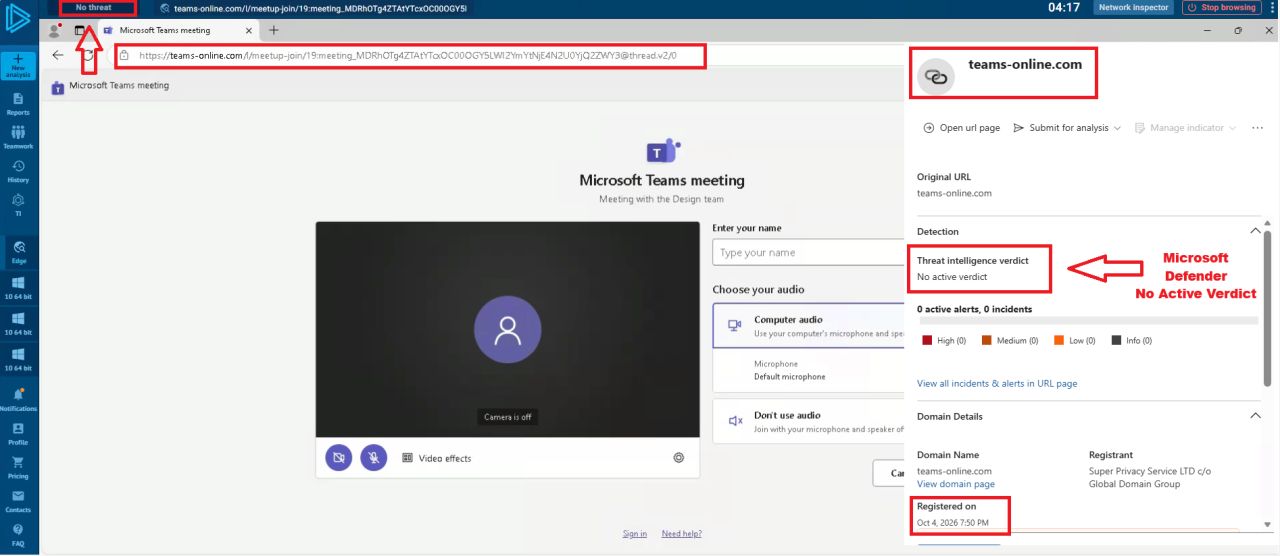
Indicators of Compromise (IOCs)
IndicatorDetailsDomainteams-online[.]comDomain registrationOctober 4, 2026Reported activityFake Microsoft Teams meeting interfacePrimary concernPhishing and potential credential theftInitial detection statusNo active Microsoft Defender verdict reported at discoverySubsequent reputationFlagged by multiple third-party security engines
Note: These details reflect published observations at specific times. Check current threat-intelligence sources before using them for blocking or incident classification.
SOC Investigation and Response
Security teams should:
Block the domain: Add teams-online[.]com to relevant DNS, proxy, firewall, and web-filtering block lists, following organisational procedures.
Hunt for exposure: Search DNS, proxy, firewall, browser, and endpoint telemetry for connections to the domain.
Review identity activity: Investigate suspicious Microsoft 365 sign-ins, MFA changes, and session activity following any reported interaction.
Assess affected users: Determine whether users entered credentials or approved an unexpected authentication request.
Contain credential compromise: If credentials may have been exposed, reset them through a trusted Microsoft sign-in page, revoke relevant sessions, and review authentication methods.
Preserve evidence: Retain relevant URLs, timestamps, email or chat messages, and security logs.
A connection to the domain does not by itself prove that credentials were stolen. Establish what the user did and whether subsequent account activity supports compromise.
Why Zero Detections Does Not Mean Safe
Newly registered phishing domains may have little reputation history. Security engines can therefore disagree or take time to classify a site. A valid HTTPS certificate also does not establish that a website is legitimate.
This case demonstrates why domain age, impersonated branding, URL analysis, user reports, and identity telemetry should complement endpoint protection.
Prevention
Open Teams meetings through the official Teams application or a trusted calendar invitation.
Verify the complete domain before entering credentials.
Use phishing-resistant multifactor authentication where available.
Deploy domain and URL filtering across managed devices.
Monitor for newly registered domains impersonating trusted services.
Conclusion
The reported teams-online[.]com campaign illustrates how a convincing copy of a trusted collaboration interface can create a credential-phishing risk. The initial lack of a Microsoft Defender verdict was not evidence that the site was safe, and subsequent third-party detections reinforced the need for caution.