The Fake Installer: Where the Real Attack Happens
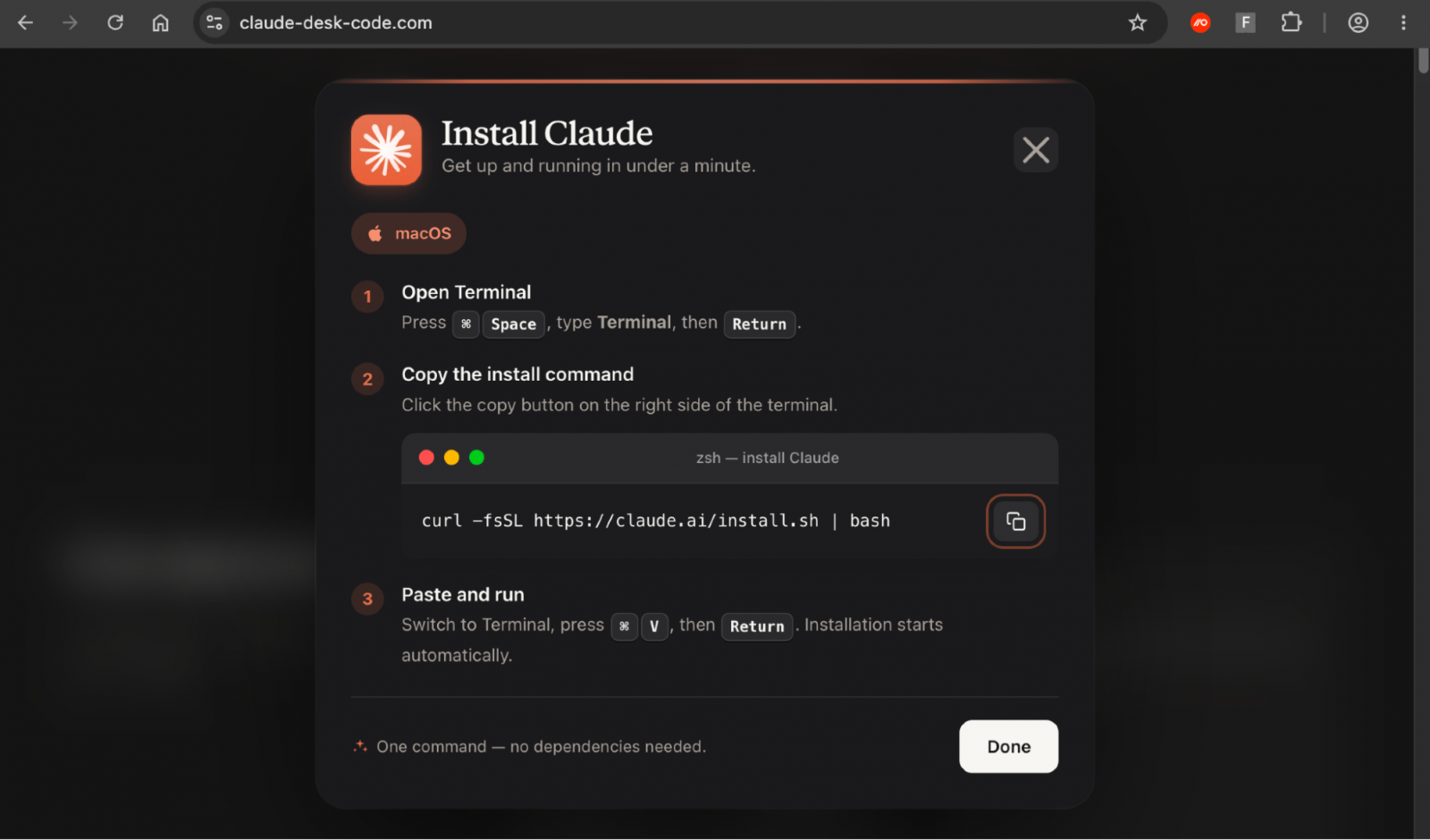
The final page presents installation instructions that resemble the process used to install Claude on macOS.
It displays Anthropic's legitimate installation command:
curl -fsSL https://claude.ai/install.sh | bash
The command retrieves a script from Claude's official domain and pipes it to Bash. Although the command is legitimate in the context described by the report, piping downloaded scripts directly into a shell still requires users to trust the source and understand what they are executing.
The more serious problem is what happens when the victim clicks the page's copy button.
Instead of copying the displayed command, the button places a different command into the clipboard.
This is the defining deception in the reported attack: the visible command and the command the victim is instructed to execute are not the same.
What the malicious command does
According to Push Security's findings as reported by BleepingComputer, the substituted command follows this sequence:
Prints a message suggesting that Claude is being downloaded from Anthropic's official website.
Decodes a Base64-encoded URL that points to lake-90[.]com.
Uses curl to silently retrieve a .dat file from that attacker-controlled server.
Pipes the downloaded contents directly into macOS Z shell (zsh) for execution.
The use of Base64 encoding can make the destination less obvious during a superficial inspection of the command.
The use of curl and a shell is not inherently malicious. Both are common administrative tools. The suspicious behaviour comes from the surrounding context: a fake installer, a mismatch between the displayed and copied commands, an encoded external destination, and the execution of remotely retrieved content.
The final payload was still unknown at the time of the supplied report. Therefore, it would be inaccurate to claim that this particular campaign definitively installed a specific infostealer, remote-access trojan, or other malware family.
What Is ClickFix?
ClickFix is a social-engineering technique that persuades users to carry out actions that execute malicious instructions on their own systems.
Instead of relying solely on a traditional file download or an exploit, an attacker presents a plausible reason for the user to interact with the operating system—for example, to fix an error, verify access, or install software.
In this case, the fake Claude page presents a familiar installation workflow. The user is encouraged to copy a command and paste it into Terminal.
The attacker exploits the user's trust in the software brand and the apparent simplicity of the installation process.
This approach can bypass some protections that focus heavily on downloaded files. The initial action is performed by the user, and the malicious activity may begin through built-in utilities such as curl and zsh.
However, ClickFix does not automatically bypass every security control. Endpoint detection, command-line monitoring, network filtering, and user awareness can still help detect or prevent the activity.
The AcSig Connection
Push Security identified several domains associated with the same ClickFix toolkit, which it tracks internally as AcSig.
According to the report, the related domains shared the same macOS installation command, payload URL structure, and installer interface.
These similarities suggest that the campaign may be part of a broader reusable delivery mechanism rather than an isolated fake download page.
For threat hunters, shared scripts, clipboard behaviour, URL structures, page templates, and execution patterns can provide useful links between related incidents—even when attackers change individual domains.
Nevertheless, the shared toolkit association should be distinguished from confirmed attribution to a specific threat actor. The supplied report does not identify a named individual or group responsible for the campaign.
SOC Investigation: What Should Analysts Look For?
The following are recommended investigation steps based on the reported attack chain, not claims that every affected endpoint will exhibit every indicator.
1. Investigate the Initial Browser Journey
Review browser history, DNS logs, secure web gateway records, and proxy telemetry for visits to:
Google search advertisements related to Claude.
Bing's bing.com/ck/a click-tracking endpoint.
The compromised WordPress website identified in the investigation.
claude-desk-code[.]com.
Where available, preserve the redirect chain and referrer details. A direct visit to the final domain may not reproduce the malicious page because of the campaign's cloaking behaviour.
2. Review Clipboard and Terminal Activity
If the user interacted with the fake installer, investigate whether a command was pasted into Terminal.
Look for suspicious command-line activity involving:
curl retrieving content from an unfamiliar external domain.
Base64 decoding associated with the construction of a download URL.
A downloaded .dat file.
Content piped directly into zsh.
Terminal activity occurring shortly after the suspicious browser session.
A match on curl, Base64, or zsh alone is not sufficient to establish malicious activity. Correlate command sequences, destination domains, timestamps, and user reports.
3. Examine Network Connections
Search DNS, proxy, firewall, and endpoint network telemetry for connections to:
claude-desk-code[.]com
lake-90[.]com
Investigate whether the endpoint downloaded the reported .dat file and whether additional outbound connections followed.
If the downloaded content is available, preserve it for controlled analysis rather than executing it on a production device.
4. Determine Whether Code Executed
Establish whether the user only visited the page, copied the command, pasted it into Terminal, or actually executed it.
These are different stages of exposure.
If the command ran, investigate the downloaded content, process tree, persistence changes, file modifications, and subsequent network activity. Because the final payload was unknown in the supplied report, do not assume a particular malware family without additional evidence.
5. Contain and Recover
If execution is confirmed or strongly suspected, follow the organization's macOS incident-response procedure.
Preserve evidence, isolate the endpoint where appropriate, identify any resulting payload, and assess possible credential exposure. If credentials were entered or accessed during the incident, reset affected credentials from a clean device and revoke relevant sessions or tokens where appropriate.
Removing the suspicious browser bookmark or closing the fake download page is not enough if a command has already executed.
Indicators of Compromise (IOCs) and Technical Indicators
The following indicators are derived from the supplied report.
Domains and URLs
IndicatorContextclaude-desk-code[.]comFake Claude download pagelake-90[.]comReported destination used to retrieve the malicious .dat payloadbing.com/ck/aLegitimate Bing click-tracking endpoint abused in the redirection chainCompromised South American retailer's WordPress websiteIntermediate redirector; the supplied text does not provide its domain
Command and Behavioural Indicators
A page displaying the legitimate command curl -fsSL https://claude.ai/install.sh | bash while its copy button places a different command on the clipboard.
Base64 decoding used to construct a URL pointing to lake-90[.]com.
curl downloading a .dat file from the reported destination.
Downloaded content piped directly into zsh.
Browser redirects conditioned on referrer information and browser headers.
A fake installer page returning a 404 error when accessed outside the expected redirect path.
Detection caution: Bing's click-tracking endpoint, curl, Base64 encoding, and zsh are not inherently malicious. Detection should focus on the full sequence and the relationship between the fake installer, clipboard substitution, external download, and shell execution.
The supplied report does not identify the final payload or provide file hashes. No payload family or hash is inferred here.
How to Defend Against This Technique
For individual users:
Download software through a verified official website or trusted distribution channel.
Do not execute terminal commands merely because a sponsored result or download page instructs you to do so.
Inspect copied commands before running them, especially commands that download remote content and pipe it directly into a shell.
Treat unexpected encoded URLs and unfamiliar download domains as reasons to stop and verify the source.
For organizations:
Monitor unusual command-line download and shell-execution chains on macOS.
Use endpoint protection and web filtering to detect suspicious destinations and execution behaviour.
Review browser telemetry and redirect chains during investigations of suspicious search advertisements.
Restrict unnecessary administrative privileges and apply appropriate endpoint controls.
Educate users that a legitimate-looking website or displayed command does not guarantee that clipboard contents are safe.
Conclusion
Adception demonstrates how attackers can combine legitimate advertising infrastructure, compromised websites, browser cloaking, and clipboard manipulation to make a malicious installation appear routine.
The attack does not depend on a confirmed vulnerability in Claude or macOS. Instead, it abuses the user's trust in a software brand and the assumption that a copied command matches what is displayed on the screen.
For SOC teams, the strongest investigative approach is to connect the entire chain—from the sponsored search result and redirects to the clipboard-substituted command, remote download, and shell execution.
For users, the central lesson is simple: never execute a terminal command solely because a website tells you it is required to install trusted software. Verify the source and inspect what the command will actually do.